Replaces the Grok button on every tweet with an AI command menu offering 3 built-in modes (Fact Check, Deep Analysis, Translate) and 2 fully customizable slots. Each mode can be sent to Grok's sidebar drawer or privately via x.com/i/grok. Supports manual or auto-send, multi-language auto-detection, and per-language customizable prompt templates. Ideal for casual users who want quick AI-powered context on trending topics without diving deep.


 📍 Author: GitHub | Script: Repository
Replaces the Grok button on every tweet with a five-mode AI command menu, complete with notification forwarding and per-language prompt customization.
💡 Overview After installation, each tweet's Grok button becomes a dropdown menu offering three built-in analysis modes and two fully customizable slots. Results can appear in Grok's sidebar or in a private tab that leaves no browsing history. An optional notification module lets you forward AI results to Discord or Telegram, and all five prompt templates are editable per language.
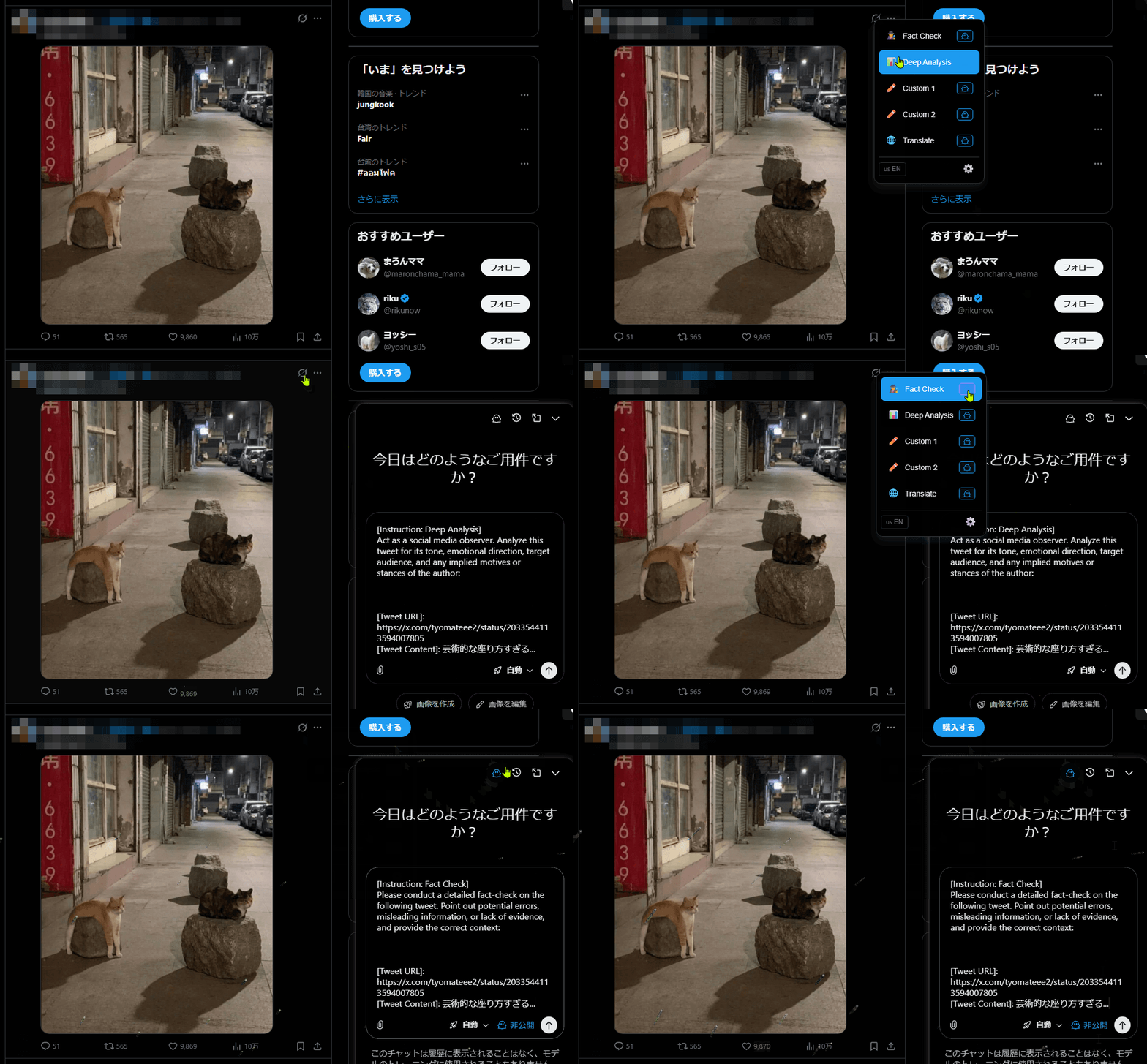
After installation, you'll see a modified Grok button on each tweet. Clicking it opens the command menu. Settings are accessible from the browser's userscript manager menu.
| Icon | Feature | Where It Appears |
|---|---|---|
| 🤖 | Command Menu | Replaces the existing Grok icon on every tweet |
| 🔒 | Private Mode toggle | Inside the command menu, per mode |
| 📤 | Push Notification | Inside the command menu, after a mode runs |
| ⚙️ | Settings Panel | Userscript manager menu → "Grok Commander 設定" |
Submits the tweet to Grok with a pre-built fact-checking prompt.
Because it is natively connected to X's real-time data stream, Grok has immediate context on trending topics, public figures, and platform-specific events that other AI tools would need to retrieve indirectly. For social media content in particular, that native awareness makes a practical difference.
This script is intended for casual users who occasionally encounter an unfamiliar post and want a quick, structured way to get context — without opening a new tab, pasting text manually, or writing a prompt from scratch.
While this provides a fast way to gather context, AI-generated verification should not be treated as fully authoritative. Users are encouraged to review the source links provided by Grok, compare them with other references if needed, and form their own judgment. AI-assisted summaries are meant to serve as a starting point for understanding, not as a final source of truth.
Asks Grok to evaluate the tweet's tone, implied stance, emotional direction, and target audience.
Translates the tweet into your detected language and explains any internet slang, memes, or cultural references embedded in the text.
Two fully open prompt slots you can rename and reprogram to do anything you want.
💡 Flexible Use of Prompt Templates The built-in modes provide structured examples for fact checking, analysis, and explanation. However, all prompt templates in this script are editable. By modifying the custom slots — or even the built-in modes — users can adapt the menu to support other tasks according to their own needs. The script does not restrict how Grok is used; verification is simply one of many possible applications.
Forward AI results directly to a Discord channel or Telegram chat after any mode runs.
⚠️ This feature requires you to provide your own Discord Webhook URL or Telegram Bot Token. These credentials are stored locally on your device and sent only to Discord's or Telegram's own servers. They are never transmitted elsewhere.
In Settings, you can view and rewrite the prompt for each of the five modes. Changes are saved per language — the script maintains separate templates for each language profile you configure.
Use the Export Template and Import Translation buttons in Settings to back up your current prompt templates as JSON, share them with others, or load a community-made translation pack.
Toggle between manual (you confirm before sending) and auto-send in Settings. Manual mode is the default to prevent accidental submissions.
This script connects to external services only when you explicitly use the Push Notification feature.
| Service | Purpose | Optional? | Link |
|---|---|---|---|
| Discord (via Webhook) | Forward AI results to a Discord channel | Yes | discord.com |
| Telegram (via Bot API) | Forward AI results to a Telegram chat | Yes | telegram.org |
💡 If you do not configure Push Notifications, this script makes no external network requests. All other features communicate only with X (Twitter) and Grok directly through your browser.
⚠️ The Push Notification feature requires you to enter your own Discord Webhook URL and/or Telegram Bot Token.
| Data Type | Source | Purpose | Storage | Transmitted To |
|---|---|---|---|---|
| Discord Webhook URL | You provide | Send results to Discord channel | Saved locally on your device | Discord's servers only |
| Telegram Bot Token | You provide | Send results to Telegram chat | Saved locally on your device | Telegram's servers only |
| Script preferences (send mode, templates) | Script generates | Remember your settings | Saved locally on your device | Nowhere |
This script does not collect, share, or transmit your credentials to any server other than the service you configured.
💡 Push Notifications are entirely opt-in. No credentials are required to use the five analysis modes. If you never open the Push Notification settings, nothing is stored or transmitted.

