X (Twitter) Timeline & Thread Archiver

Elegant and minimalist timeline & thread archiver for X.

You will need to install an extension such as Tampermonkey, Greasemonkey or Violentmonkey to install this script.

You will need to install an extension such as Tampermonkey to install this script.

You will need to install an extension such as Tampermonkey or Violentmonkey to install this script.

You will need to install an extension such as Tampermonkey or Userscripts to install this script.

You will need to install an extension such as Tampermonkey to install this script.

You will need to install a user script manager extension to install this script.

(I already have a user script manager, let me install it!)

Advertisement:

You will need to install an extension such as Stylus to install this style.

You will need to install an extension such as Stylus to install this style.

You will need to install an extension such as Stylus to install this style.

You will need to install a user style manager extension to install this style.

You will need to install a user style manager extension to install this style.

You will need to install a user style manager extension to install this style.

(I already have a user style manager, let me install it!)

Advertisement:

Author
Yumeka
Daily installs
0
Total installs
58
Ratings
1 0 0
Version
v2026.3.20.2
Created
2026-03-16
Updated
2026-03-20
Size
34.5 KB
License
MIT
Applies to

X (Twitter) Timeline & Thread Archiver

x-logo

极简的 X (Twitter) 时间线与帖子归档助手。

MIT License GitHub repo size GitHub stars
Greasy Fork Install Userscript


特性:

preview

  • 极简、纯粹的逻辑与交互,代码行数 500 左右(LOC);
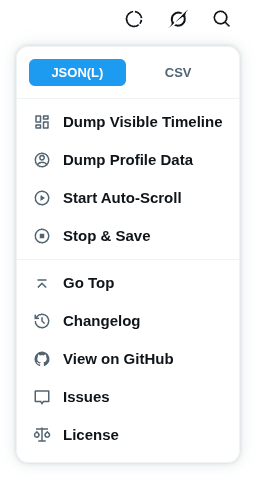
  • 针对于 X 页面的虚拟节点,提供自动滚动功能便捷获取 时间线 (Timeline) 与 帖子回复详情 (Thread);
  • 输出格式为 JSON(L) 或 CSV,基础数据包含各项互动指标(点赞、转贴、查看等)、帖子上下文、图文内容,并自动解析引用帖子;
  • 提供实用功能,例如导出账户信息、中途停止并保存、返回顶部等。

[!NOTE] 时间线上裸露在外的回复(推文串),或者帖子详情中回复下裸露的子回复,会自动跳过解析以符合数据直觉。

交互:

  • 融入 X 网页 UI,支持自动深色切换;
  • 菜单采用上下文感知,根据所处视图自动展示或隐藏对应功能。

入口:

  • 时间线/主页: 页面中栏顶部区域(搜索/Grok 按钮附近);
  • 帖子详情: 每个帖子卡片右上角的 “更多” 按钮附近。

完整推文树:

原本想要内置自动获取并解析完整的推文树的功能,但似乎非常困难且容易造成账号风控。所以目前仍需手动点击进入回复详情页,来查看或归档特定的子回复。

仓库内置了一个极简的 twtree.py 脚本,专门用于合并数个 JSON 文件为完整的推文树,还支持导出人类阅读友好的 TXT 格式。

> ./twtree.py --help
usage: twtree.py [-h] [-i INDENT] [-t {json,txt}] [-f FORMAT] [files ...]

positional arguments:
  files

options:
  -h, --help            show this help message and exit
  -i, --indent INDENT
  -t, --type {json,txt}
  -f, --format FORMAT   Line format for txt output.
                        Available placeholders: {id}, {time}, {name}, {handle}, {text}, {media}
                        Default: '{name}({handle}) {text}'

用法示例:

  1. 原始合并:输入数个 JSON,然后将合并后的 JSON 打印到标准输出

    ./twtree.py x/*.json
    

    将自动查找没有父级帖子 ID 的孤立帖子作为树顶,允许包含多个树顶,
    children 数组包含了子回复,允许多重嵌套,最终表达为完整的帖子树结构

  2. 人类阅读友好格式:输入数个 JSON,合并为 TXT,

    > ./twtree.py x/*.json -t txt
    

    合并后的 TXT,一个帖子一行,使用缩进表达层级嵌套的树结构

    支持使用 -f 指定输出格式,默认为 {name}({handle}) {text}

数据结构示例 (JSON):

[!NOTE] 时间线(Timeline)的 JSONL 与帖子详情(Thread)的 JSON, 内部单条推文的数据模型是完全等价的
区别在于外层包装, JSONL 为逐行独立对象, JSON 为标准的数组结构

{
  "id": "1890000000000000000",
  "url": "https://x.com/username/status/1890000000000000000",
  "context": "你已转贴", 
  "time": "2026-03-18T12:00:00.000Z",
  "author": {
    "name": "",
    "handle": "",
    "avatar": ""
  },
  "content": {
    "text": "",
    "media": []
  },
  "quote": {
    "author": {
      "name": "",
      "handle": "",
      "avatar": ""
    },
    "time": "",
    "content": {
      "text": "",
      "media": []
    }
  },
  "metrics": {
    "replies": 0,
    "retweets": 0,
    "likes": 0,
    "bookmarks": 0,
    "views": 0
  }
}