GlideVideo: Better Video Controls with Gesture for Mobile Web

Makes mobile web video actually usable — control playback, volume, zoom, and aggressive preloading without fumbling for tiny buttons, all through natural touch gestures. Works on any browser that support extension like Edge, Firefox, Cromite etc.

You will need to install an extension such as Tampermonkey, Greasemonkey or Violentmonkey to install this script.

You will need to install an extension such as Tampermonkey to install this script.

You will need to install an extension such as Tampermonkey or Violentmonkey to install this script.

You will need to install an extension such as Tampermonkey or Userscripts to install this script.

You will need to install an extension such as Tampermonkey to install this script.

You will need to install a user script manager extension to install this script.

(I already have a user script manager, let me install it!)

Advertisement:

You will need to install an extension such as Stylus to install this style.

You will need to install an extension such as Stylus to install this style.

You will need to install an extension such as Stylus to install this style.

You will need to install a user style manager extension to install this style.

You will need to install a user style manager extension to install this style.

You will need to install a user style manager extension to install this style.

(I already have a user style manager, let me install it!)

Advertisement:

نووسەر
quantavil
Daily installs
0
Total installs
101
Ratings
1 1 0
وەشان
5.0.0
Created
2026-02-11
Updated
2026-06-20
Size
127 KB
مۆڵەت
MIT
Applies to
هەموو سایتەکان

GlideVideo

GitHub

A premium, highly polished mobile userscript that brings rich touch gestures, advanced visual controls, and an ergonomic floating overlay to HTML5 web video players. Designed specifically for mobile browsers like Firefox, Cromite, Kiwi, Orion, and Edge.
📱 Screenshots

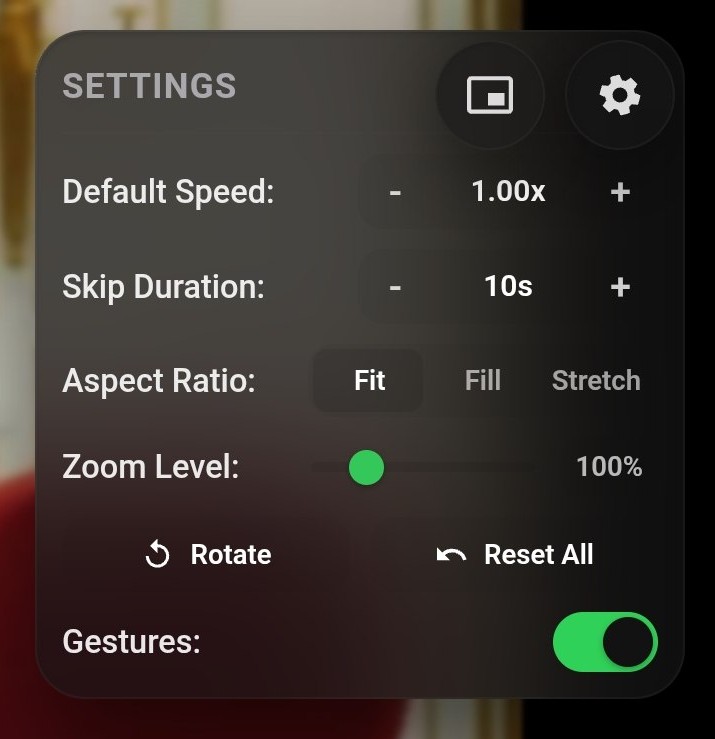
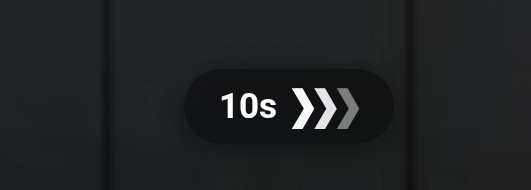
GlideVideo Overlay and Speed Stepper    GlideVideo Settings Panel


✨ Features

📐 Ergonomic Split Layout

  • Left-Aligned SpeedStepper: Quick-access speed controls tucked neatly in the top-left corner.
  • Right-Aligned Settings Trigger: Anchored gear icon in the top-right to pull down the configuration sheet.
  • Clean Gesture Zone: The entire middle and lower portions of the video screen are kept entirely unobstructed for natural, comfortable touch gestures.

⚡ SpeedStepper Pill

  • Coarse Steps: Tap + or to instantly adjust playback speed by ±0.10x (e.g., 1.00x → 1.10x → 1.20x).
  • Fine-Tuning Holds: Press and hold + or for continuous sub-steps of ±0.05x. If held for more than 1 second, it automatically accelerates to ±0.10x increments for rapid speed scanning.
  • Play/Pause Toggle: Tap the speed display label to instantly play or pause the active video player.
  • Instant Reset: Long-press the speed display to instantly revert playback speed back to 1.00x with a tactile haptic vibration confirmation.

⚙ Unified Settings Sheet

A premium, glassmorphic dropdown card anchored right underneath the settings gear:

  • Default Playback Speed: Establish a persistent fallback speed for all new videos.
  • Skip Duration: Customize the distance (in seconds) used during seeks.
  • Aspect Ratio Controller: Segmented control to choose between Fit (contain), Fill (cover), and Stretch (fill).
  • Zoom Level Slider: Precise adjustment slider for scaling the video stream from 0.5x to 3.0x.
  • Rotate Action: Incrementally rotates the video stream by 90° steps.
  • Reset All: Quickly restores all visual transforms and configuration variables back to standard defaults.
  • Gesture Toggle: Instantly enable or disable gesture listeners on the fly.
  • Preloading Switch: Configures aggressive native preloading and optimizes internal browser buffers for faster playback response.
  • Volume Boost Switch: Toggle whether volume swipe can amplify sound up to 200%.
  • Scroll Feed Compat Switch: Toggle X-Mode scrolling compatibility in portrait view.

🖐 Touch Gestures & Snap Controls

  • Double-Tap to Skip (YouTube-style Redesign): Double-tap the left half of the video screen to rewind, or the right half to fast-forward by the customized skip duration. Supports rapid consecutive taps (triple/quadruple tap) to accumulate seek distance (10s → 20s → 30s...), showing animating chevrons inside a beautiful compact inline glassmorphic pill (mvc-doubletap-inner). Automatically intercepts native player double-clicks to prevent accidental fullscreen toggling.
  • Volume Swipe & Amplification: Swipe vertically up or down on the right half of the video screen to adjust the audio volume level (from 0% to 100%). Swiping up beyond 100% amplifies the audio up to 200% using the Web Audio API (visualized by a special speaker boost icon 🔊⚡ and an orange glow fill bar).
  • Brightness Swipe: Swipe vertically up or down on the left half of the video screen to adjust the display brightness level (from 10% to 100%). Displays a matching vertical slider overlay on the left edge of the video with real-time percentage readouts and dynamic sun/moon icons, and updates a smooth black backdrop overlay.
  • Swipe to Seek: Drag left or right across the video screen to rewind or fast-forward. Includes a beautiful, live-updating duration HUD showing the target timestamp and seek offset.
  • Speed Boost Hold: Long-press and hold on the video content to temporarily accelerate playback to 2.00x. Releasing your finger restores your previous speed instantly.
  • Pinch-to-Zoom Snap: Pinch with two fingers to adjust scale. When released, the zoom level automatically snaps to the closest key marker (50%, 100%, 125%, 150%, 200%, 300%) accompanied by a subtle haptic pulse.
  • Screen Gesture Lock: Tap the top-right padlock button (🔓 / 🔒) to block all gesture inputs and overlay overlays (excluding the lock button itself) to prevent accidental palm/finger touches.
  • Scroll Feed Compat (X-Mode): In portrait layout, horizontal swipes still allow seek controls, but vertical swipes are bypassed to let the parent page scroll natively (great for Twitter/X video feeds).
  • Edge Touch Protection: Rejects gestures starting within 18px of the left or right viewport edges to avoid conflicts with browser swipe navigation history (back/forward).
  • Ergonomic Safety: Rotation gestures are completely decoupled from pinch zoom to eliminate accidental screen tilting.

⚡ Aggressive Preloading & Buffer Tuning

  • Native Preload Enforcement: Forces target videos to use native preload="auto" to begin downloading before playback commences.
  • Silent Kickstart: Runs a silent, muted play-pause loop behind the scenes to force the browser to initiate connection buffering immediately.
  • Hls.js Buffer Tuning: Patches standard streaming libraries on third-party portals to increase segment buffer bounds up to 90 seconds (useful for DASH/HLS streams).

🌌 Liquid Glass UI

  • Outfitted with a premium Liquid Glass visual aesthetic. Features soft organic rounded corners (24px sheets, 20px capsules), perfect circular drop shapes, highly translucent background layers, reflective glossy borders, and a top-edge inner light shine shadow that dynamically sits on top of backdropped blur.
  • Rate-Fighting Safety: Displays a warning toast informing you if the website is aggressively overriding your manual playback speed adjustments (stops fighting after 3 attempts to prevent page scripts from causing a loop crash).

🛠 Tech & Architecture

  • Pub/Sub decoupling: Components and views emit events on the EventBus to prevent tight cross-linking.
  • Shadow DOM Integration: Traversing tree structures to locate and hook into video elements embedded inside open Shadow Roots (e.g., YouTube components).
  • Fluid Layout Tracking: Active resize observers, visual viewport listeners, and scroll monitors keep controls anchored perfectly alongside the target video element even inside nested, scrollable wrappers.
  • Fullscreen Portability: Detects browser full-screen switches and seamlessly relocates the interactive overlay directly inside the native full-screen wrapper.

🚀 Development & Commands

Built with TypeScript, Vite, and Bun.

Setup

  1. Install dependencies:

    bun install
    
  2. Development Hot Reload:

    bun run dev
    

    Installs a local development userscript link directly into Tampermonkey/Violentmonkey to auto-refresh changes.

  3. Production Build:

    bun run build
    

    Compiles and bundles the target code to a standalone userscript file at dist/glidevideo.user.js.

  4. Lint & Type Checks:

    bun run tsc
    
  5. Regression Tests:

    bun run test
    

📄 License

MIT
