Torn Junk Seller

Automates pricing with support for fixed prices, API, and RRP.

You will need to install an extension such as Tampermonkey, Greasemonkey or Violentmonkey to install this script.

You will need to install an extension such as Tampermonkey to install this script.

You will need to install an extension such as Tampermonkey or Violentmonkey to install this script.

You will need to install an extension such as Tampermonkey or Userscripts to install this script.

You will need to install an extension such as Tampermonkey to install this script.

You will need to install a user script manager extension to install this script.

(I already have a user script manager, let me install it!)

Advertisement:

You will need to install an extension such as Stylus to install this style.

You will need to install an extension such as Stylus to install this style.

You will need to install an extension such as Stylus to install this style.

You will need to install a user style manager extension to install this style.

You will need to install a user style manager extension to install this style.

You will need to install a user style manager extension to install this style.

(I already have a user style manager, let me install it!)

Advertisement:

Аўтар
Vexarit
Усталяванняў за дзень
3
Усяго ўсталяванняў
298
Рэйтынг
0 0 0
Версія
2.2.2
Створаны
18.03.2026
Абноўлены
09.06.2026
Памер
65.4 КБ
Ліцэнзія
CC BY-ND 4.0
Ужываецца на

TORN JUNK SELLER

TAMPERMONKEY USERSCRIPT · v2.2 · by Vexarit [3688270]

Automatically prices your Market listings and Bazaar items using live Torn API data. No more manual price lookups - save items once, get competitive prices every session.

HOW IT WORKS

Torn Junk Seller is designed to speed up listing items on the Torn market, especially large amounts of low-value loot gained from crimes. Its main purpose is to remove repetitive actions and make everyday selling faster and more convenient.

When you open the item listing page, the script adds simple buttons directly next to each item. With a single click, you can automatically set a price based on the Recommended Retail Price, adjusted by your chosen margin and rounded to clean values.

You can also save specific items for future use. Once an item is saved, the script will recognize it and automatically apply your pricing rules whenever it appears again. This is especially useful for commonly dropped items, letting you list them almost instantly without repeating the same steps.

Button
ASemi-automatic pricing for a single item - fetches current market data and sets the price instantly.
SSaves the item for automatic listing - price is applied automatically every time you open the market.
DRemoves the item from automatic listing.

On the right side of the screen, a small settings widget lets you adjust your price margin and rounding. The panel also includes import and export options for backing up your saved items.
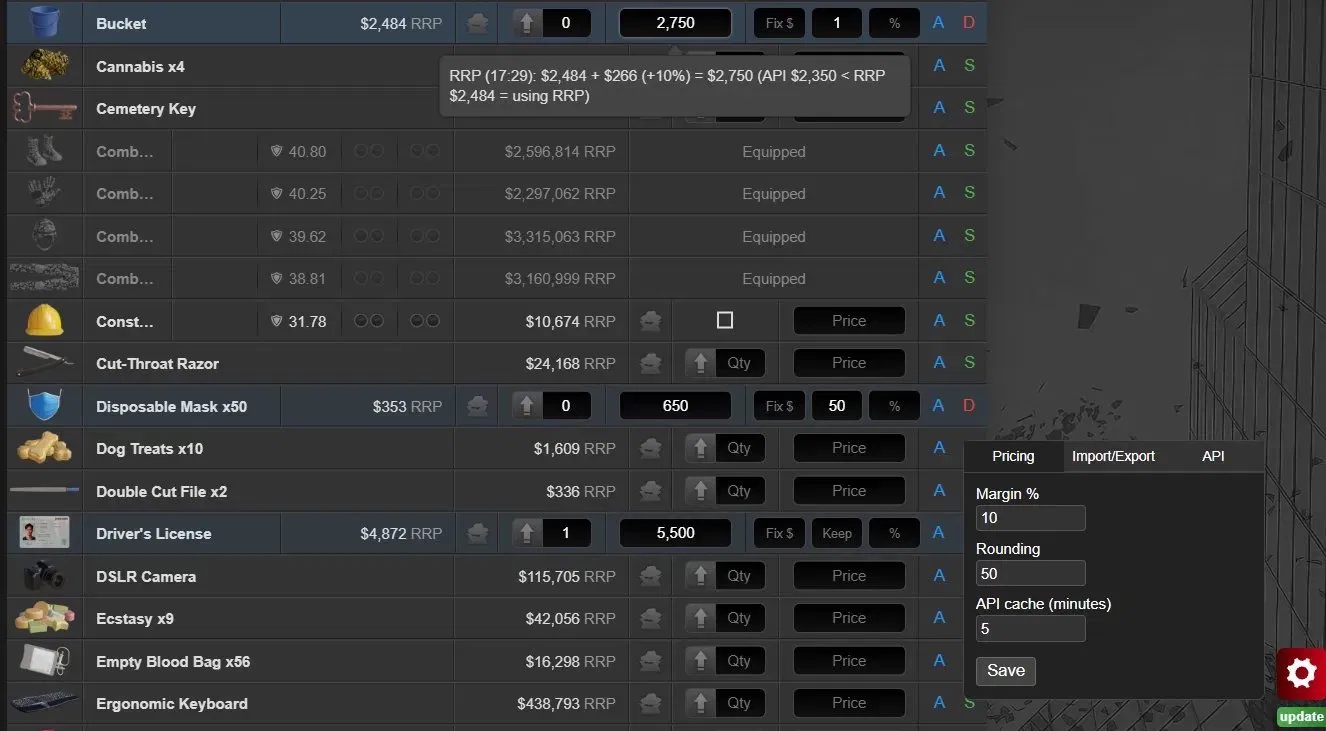

SCREENSHOT

Torn Junk Seller in action

Item Market view - auto-pricing with tooltip showing price breakdown, Fix $, Keep and % controls per item.


FEATURES

Auto-Pricing
One click sets a competitive price for any item. Works on Item Market and Bazaar alike.
Bulk Seller Detection
Detects players selling 200+ of the same item and applies a 10% discount to their price as your base - so you always undercut mass sellers. Toggle on/off in settings.
Fixed Price Override
Pin an exact dollar amount to a specific item. API and RRP are ignored - that price is always used. Ideal for rare or high-value items.
Per-Item Margin %
Set a custom markup for a single item, independent of the global margin setting.
Keep Quantity
Specify how many of an item to keep for yourself. If you have 20 and Keep is set to 5 - only 15 get listed.
Price Locking
Lock an item's price so it won't be changed by auto-refresh or bulk updates. Green padlock = locked, orange = unlocked.
Save Items
Mark items to be auto-priced every time you open the listing page - no clicks needed each session.
Price Rounding
Rounds final prices to the nearest set value (e.g. $50) - listings look clean instead of ending in odd numbers.
Price Tooltip
Hover over an item to see a full breakdown: source, base price, margin amount, and timestamp of the last API fetch.
Refresh All
Re-fetches market prices for all your active listings in one click. Locked items are skipped automatically.
View Listing Support
Manage fixed prices, margins, and refresh individual item prices directly on your active listings page.
Import / Export
Back up and restore all saved items, keep quantities, margins, and fixed prices as JSON - useful when switching browsers.
Update Notifier
Checks Greasy Fork automatically and shows a small side banner when a newer version of the script is available.

API KEY - OPTIONAL BUT RECOMMENDED

Without API KeyWith API Key
Prices based on RRP onlyLive market lowest prices
No real-time market dataBulk seller detection active
No bulk seller detectionPrice cache (adjustable TTL)
Fully functional otherwiseTooltip shows fetch timestamp

Requires a Public Only key - the lowest permission level. Generate one at: Torn Settings - API Keys


INSTALLATION

  1. Install the Tampermonkey browser extension (Chrome, Firefox, Edge, Safari).
  2. Click Install on this page and confirm with Install This Script.
  3. Optional: Go to Torn Settings - API Keys, generate a Public Only key, and paste it in the script's API tab.
  4. Open Item Market or your Bazaar - the script loads automatically.

IMPORTANT: If the script is not working, make sure you have user scripts enabled in Tampermonkey:

https://www.tampermonkey.net/faq.php?locale=en#Q209


CHANGELOG


Update 2.2
  • Added player listing exclusion - own listings are now filtered out when fetching market prices, preventing negative margin spiral where the script would repeatedly undercut its own offers
  • Added configurable bulk seller threshold - minimum item quantity to qualify as a bulk seller is now adjustable in Settings, defaulting to 200
  • Bulk seller threshold is reflected in price tooltips - when no bulk seller is found, the tooltip now shows the current threshold for reference


Update 2.1
  • Added confirm page summary - net value per item and grand total displayed directly on the listing confirmation screen, with anonymous listing fee support (5% or 15%)
  • Added per-item net value label on the viewListing page - shows net amount after fee for each listed item
  • Added portfolio summary on the viewListing page - total listed quantity, gross value, fees, and net value displayed below the item list, with a hover tooltip showing the full breakdown
  • Portfolio summary and per-item net values account for anonymous listing fee per item individually (5% standard, 15% when anonymous mode is active)
  • Improved selector resilience - layout-dependent class names replaced with attribute-based selectors throughout, reducing the risk of breakage after Torn UI deployments


Update 2.0
  • Added real-time market pricing via Torn API (requires a Public Only API key; falls back to RRP if no key is set)
  • Added automatic bulk seller detection - applies a -10% discount when a seller lists 200+ of the same item
  • Added API price cache with configurable TTL (default: 5 minutes)
  • Added fixed price override per item ("Fix $" field - overrides API/RRP entirely)
  • Added price lock per item (padlock icon - prevents the price from being changed by Refresh All)
  • Added support for the viewListing page (active listings view)
  • Added "Refresh All" button on viewListing - re-fetches and updates all unlocked item prices at once
  • Added automatic update notification when a newer version is available on GreasyFork
  • Replaced separate market/bazaar import-export with a single unified JSON export
  • Replaced flat settings panel with a tabbed layout (Pricing / Import-Export / API)
  • Added bulk seller detection toggle in Settings - Pricing (when disabled, bulk sellers are ignored and pricing falls back to the regular market lowest)


Update 1.6
  • Updated compatibility with the new interface version


Update 1.5
  • Added support for bazaar


Update 1.4
  • Added the ability to set individual margins for specific items (defaults to the global configuration if not specified)
  • Updated the appearance and positioning of elements in the list
  • Excluded the item listing subpage from functionality
  • Improved compatibility with other plugins


Update 1.3
  • Added the ability to set how many items should remain after the sale


Update 1.2
  • Added support for negative margin values
  • Changed button A (Auto) color from green to blue
  • Changed button S (Save) color from magenta to green
  • Improved settings panel button padding and hover state


Update 1.1
  • Added support for grouped items

CC BY-ND 4.0 · Vexarit [3688270] · Greasy Fork