
Welcome to Greasy Fork, a site for user scripts.
What are user scripts?
User scripts put you in control of your browsing experience. Once installed, they automatically make the sites you visit better by adding features, making them easier to use, or taking out the annoying bits. The user scripts on Greasy Fork were written by other users and posted to share with the world. They're free to install and easy to use.
Step 1: install a user script manager
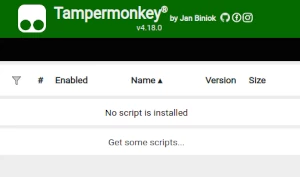
To use user scripts you need to first install a user script manager. Which user script manager you can use depends on which browser you use.
Desktop Mobile (Android) Mobile (iOS)
- Chrome: Tampermonkey
- Firefox: Greasemonkey, Tampermonkey, or Violentmonkey
- Safari: Tampermonkey or Userscripts
- Microsoft Edge: Tampermonkey
- Opera: Tampermonkey or Violentmonkey
- Maxthon: Violentmonkey
- AdGuard: (no additional software required)
- Firefox: Greasemonkey, Tampermonkey, or Violentmonkey
- Microsoft Edge: Tampermonkey
- Maxthon: Violentmonkey
- Dolphin: Tampermonkey
- UC: Tampermonkey
- XBrowser
- Safari: Tampermonkey or Userscripts
- Gear: (no additional software required)
- Teak: (no additional software required)
Step 2: install a user script
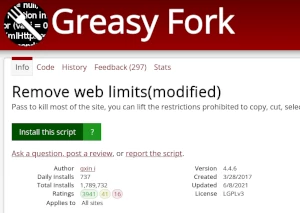
Browse this site to find a user script you want to try. Here is a sample of the most popular scripts:
- Get better FPS in shell shockers! - May or may not improve your fps in shell shockers.
- Online shopping assistant & Automatically query coupons & Save money - Automatically search for coupons on popular shopping platforms to help you find the best deals on the products you need, without overspending. Currently supports: Aliexpress, Lazada, eBay, Amazon, and more. (Privacy Policy: https://github.com/nuck-liu2335/script-policy)
- AURA CLIENT Universal Wireframe - Adds a wireframe view mode to most unity games
- Minecraft Texture Pack for Minefun - Every texture in MineFun replaced with its corresponding texture in Minecraft.
- JanitorV5 - Supercharge JanitorAI with Smart Reply, auto-summaries, scene context injection, style presets, advanced prompting, and encrypted community chat. Supports OpenRouter, OpenAI, Anthropic, Groq, Gemini & more. PIN-protected API key storage, Double Ratchet forward secrecy, per-room AES-256-GCM encryption, and persona library — all in one script.
Once you've found a user script, click the green install button on the user script's page, and your user script manager will ask you to confirm the install.
Step 3: use the user script
Go to the site the user script affects. It should automatically do its thing. After trying out the user script for a while, go back to where you installed the user script and leave some feedback for the user script's author.